How I Passed AWS Certified Developer (Associate) Exam in 30 Hours without any Prior AWS Experience
Clickbait Disclaimer
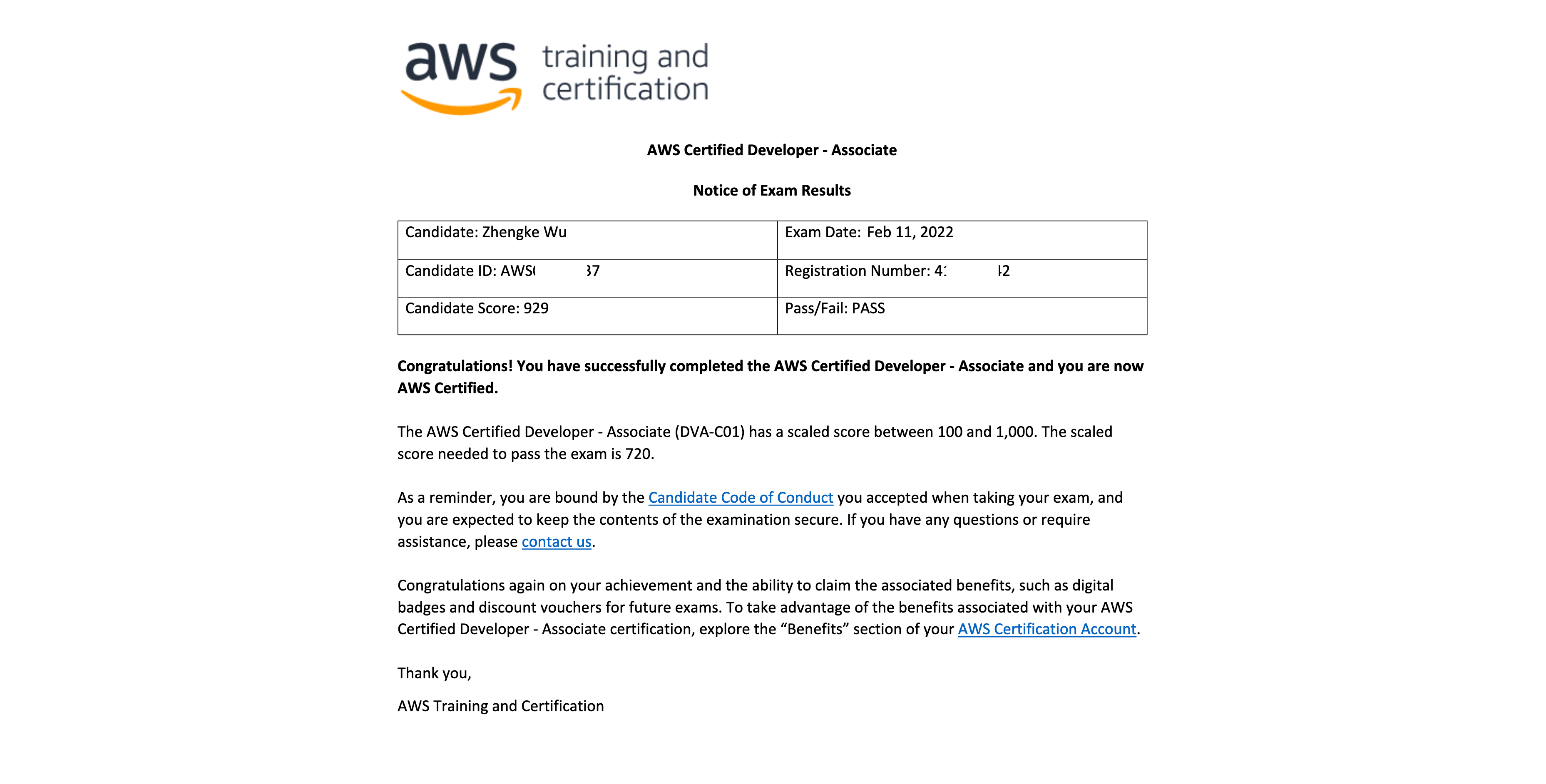
If you click into this blog post merely out of disbelief in its title, I can assure you that I did pass this exam just with 30 hours of preparation and no prior AWS experience at all (I didn’t even have an AWS account before signing up for this exam).
Here’s the score report I got after passing the exam:
And I tracked almost every minute of my preparation with TickTick Focus, and my records clearly show my total preparation hours:
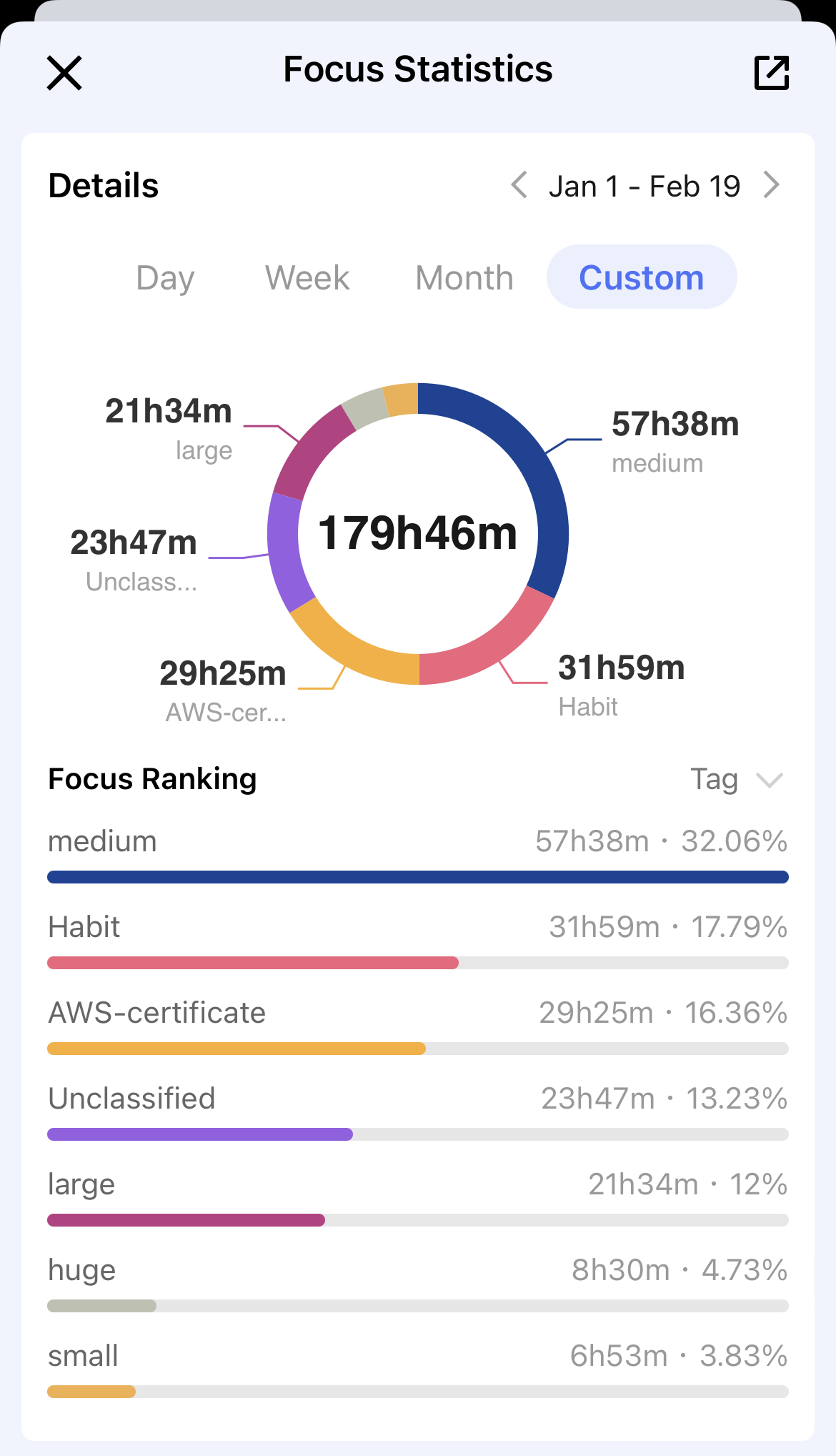
OK, now you may start to wonder: how did this guy do it? Is this AWS exam as easy as a piece of cake? Well, to avoid the suspicion of clickbait, there’re some points to clarify first:
- Although I had no experience with AWS, I have been using other cloud services for a while, like Digital Ocean for my personal projects, Azure during my past internship in Microsoft, and various internal cloud products in my current company
- I work as a software engineer in a cloud infra team of TikTok
Well, things make more sense now. So if you are a total newcomer to the cloud world, it’s not very likely that you can also earn an AWS badge within 30 hours. A bit disappointing, isn’t it?
However, in this post, I have some experience and personal advice to share, and I believe they can be of some help if you’re also considering taking the exam, especially if your background is similar to mine.
Let’s get started.
30 Hours?
Prologue
First, I signed up for this exam (of course I did) and registered for my first AWS account, ready to play with AWS during my learning hours. So here go 30 minutes.
Video Courses
Then, to get the big picture about AWS and its various products (S3, DynamoDB, ECS, Lambda… just to name a few), I chose to go through the freely available course for this exam on Youtube. It might be a little bit out-of-date as AWS is evolving fast, but generally, I think it’s good enough (and free!) for me to get a brief overview of almost all services for the exam. If you’re willing to pay, I think some course on Udemy would be a slightly better option: it’s constantly updated by tutors and better organized. But if you already understand cloud computing enough, and just want to know what AWS has for each specific domain, this video will suffice.
I watched this video course at 1.5 playback speed most of the time, but sometimes I paused and googled to double-check. In total, this video course (about 16 hours) took me 11.5 hours to finish.
After this, I had a very general idea about all those AWS products: what they are and how they fit into the big picture of cloud computing. Details and hands-on experience were what I lacked.
Practice Exams
I took a very pragmatic approach: I bought a set of practice exams on Udemy and decided to learn in an ad-hoc style (that’s to say, I didn’t learn through reading documents page by page but searching and reading on demand). The major reason behind this is that I feel AWS just too complicated with tons of documentation and trivial details, which are impossible for me to grasp in a short term.
There’re 5 practice exams, and I utilized each one very carefully:
- I first took the practice exam as if it were real to see how I fared. That’s about 1 hour each.
- Then I reviewed every question in every detail, reading all explanations and linked documents to dig deeper into the specific AWS products related to the question. Each time I came across something fuzzy to me, I tried my best to make sure I could understand its details thoroughly. This can be quite time-consuming, and on average, I spent more than 2 hours reviewing a practice exam.
- Sometimes reading the documentation was not enough: after all, AWS is something for you to use rather than to learn. So I also played with a lot of AWS products (thanks to the AWS free tier, this didn’t cost me a penny). And when trying them out, I always compared what AWS provides with what I ever used elsewhere, say, CodeCommit with Github, ECS with TCE (sorry but this is an internal platform in TikTok). In this way, I saved effort while still getting enough knowledge about them.
To sum up, I put 18 hours into these practice exams. It’s a bit longer than my expectation, but I would say, it’s extremely worthwhile. Not only did I become more familiar with the real exam, my knowledge about AWS also got sharpened through the vast documentation reading and hands-on experience.
The Real Exam
Then finally, after scoring 80%+ in these practice exams, I felt well-prepared and took the exam. It was an online exam, during which my client failed to load questions and I had to restart my laptop as instructed, but anyway, I got Congrats the moment I submitted my answers and the official exam report and badge about 20 hours later. That was speedy.
My advice
I would not say I know a lot about this exam, but just based on my personal experience, there’s some advice I’d like to share:
- This exam is not difficult, after all, it’s just an associate-level exam. If you already have some background knowledge about cloud computing (not necessarily with AWS), it’s a breeze.
- You don’t need to know (or memorize) everything in the documentation, and it’s impossible to do so in a short time.
- Instead, focus on the big picture: the general ideas behind AWS products and what real-world problems they are designed for (say, X-Ray is just something for distributed tracing if you have ever read Google’s paper about Dapper, and you can safely draw an analogy between them).
- Hands-on experience helps, as you can understand a lot intuitively when playing with these services. However, it’s not a must: I didn’t even have an AWS account before deciding to take the exam.
- Practice exams matter. You have to admit, mastering AWS is one thing, while passing the exam is another. Therefore, by taking practice exams, you know what this exam is about, and identify what is required for passing but you’re unfamiliar with so far. Also, you can feel your progress and build up confidence if you’re achieving higher scores over time.
- Take your time. You don’t have to rush through your preparation in 30 hours (or any specified amount of time) because you can always reschedule or cancel the exam. It’s not going anywhere but is always available to you.
Extra Q&A
There’re some questions I once asked myself or was asked by others. Let me put them here as an open ending.
Q1: Is this certificate worthwhile or helpful to my career?
A1: I don’t know. I don’t think such a certificate will work wonders during my job hunting or land me a better job offer in the future: there’re more factors to consider for employers and some of them are more crucial like coding ability and previous work experience. But anyway, an extra badge on my LinkedIn profile is not a bad thing.
Q2: So why did I take this exam?
A2: Well, I did it mainly because my friend was doing so and I followed suit. And of course, I also want to know more about AWS and see what it offers.
Q3: Will I try to earn more certificates from AWS?
A3: Nope. I’m not a certificate collector and as mentioned in Q1, I don’t think these certificates weigh much. There’re a lot of things as meaningful as AWS certificates to spend my time on.